How the pairing works
BAT-BMS talks to your battery over Bluetooth Low Energy. The BMS module inside your pack broadcasts a signal, the app scans for it, and once you tap connect the two shake hands. There is no cable, no pairing code, and no network needed. Everything happens between your phone and the battery.
Before you start, make sure the battery is switched on and the BMS has power. A pack that is fully asleep will not show up in the scan, which is the number one reason people think the app is broken.
Step 1: Grant the right permissions
On first launch, BAT-BMS asks for Bluetooth and Location. Both matter. Bluetooth is obvious, but Location is the sneaky one: Android will not let any app scan for Bluetooth devices without it. Tap allow on both. If you skipped this step, see the permission fix guide to grant them now.
Step 2: Scan for your battery
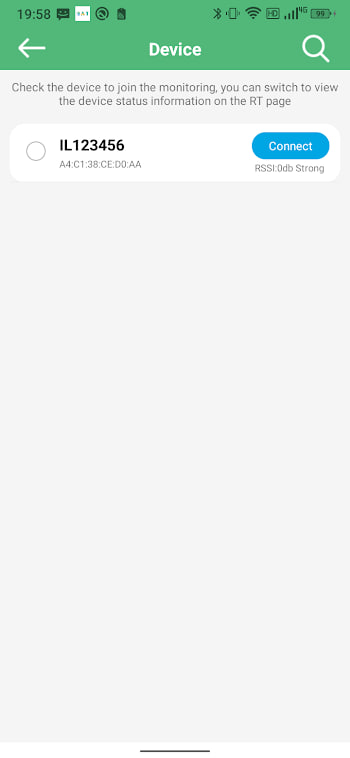
Open the app and tap the scan button, usually a small magnifier or a plus icon at the top. Hold still for a few seconds. The BMS appears in the list, often labelled with its model or a MAC address. If several devices show up, pick the one whose signal is strongest — that is almost certainly yours.
Stand within a metre or two of the battery for the first pairing. Range improves dramatically once the devices know each other.
Step 3: Tap connect
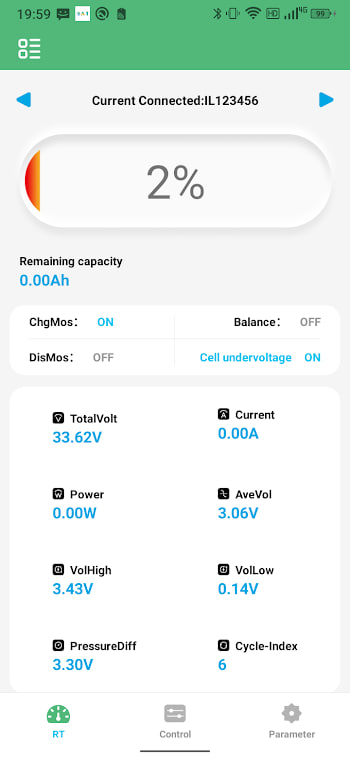
Tap your device in the list. The app spends a second or two on the handshake, then drops you onto the main dashboard. You should see total voltage, current, and a row of cells. If the numbers look alive and update when you turn a load on, the connection worked.
Step 4: Take your first reading
Let the app sit for a minute. Watch the cell voltages settle. If one cell reads much lower or higher than the others, flag it for balancing. The cell voltage guide explains what healthy looks like and when to worry.
What happens next time
BAT-BMS remembers paired devices. On later launches it usually reconnects automatically when the battery is on and nearby. If it does not, opening the scan list and tapping your device once is enough to wake the link.