Why lithium needs a babysitter
Here is a fact that surprises most people: the lithium cells inside your battery are, on their own, remarkably fragile. Not physically — they are tough little cylinders and pouches — but electrically. Charge a lithium cell a few tenths of a volt too high and it starts to damage itself. Drain it too low and it may never recover. Push too much current through it and it overheats. Let it get too hot or charge it below freezing and the chemistry degrades in ways you cannot undo.
Lead-acid batteries, the old workhorses in cars and inverters, forgive most of this abuse. Lithium does not. And yet lithium packs power everything from e-rickshaws to solar sheds to camper vans, usually for years without incident. The reason is a small circuit board bolted inside the pack that most owners never see: the battery management system, or BMS.
A BMS is essentially a full-time guardian. It watches every cell, every second, and it holds the only switch between the battery and the outside world. The moment anything drifts towards the danger zone, it disconnects. When conditions return to normal, it reconnects. No drama, no smoke, no dead pack — usually no sign anything happened at all, apart from a puzzled owner wondering why the power blinked.
That guardian role is why the question “what is a BMS?” matters to anyone who owns a lithium battery. Once you understand what the board is doing, almost every mysterious battery behaviour — sudden cut-outs, refusal to charge in winter, a pack that dies at “20%” — stops being mysterious.
The four jobs of a BMS
Strip away the electronics jargon and every BMS, from the cheapest e-bike board to a Tesla's, performs the same four protective jobs.
1. Overcharge protection
Each lithium cell has a ceiling voltage — about 4.2 V for the common li-ion chemistries and about 3.65 V for LiFePO4. Cross it and the cell begins plating metallic lithium internally, which permanently steals capacity and, in extreme cases, grows dendrites that can short the cell. The BMS watches every cell individually during charging, and the instant any single cell touches the ceiling it opens the charge switch. Note the wording: any single cell. The pack voltage might look fine overall while one cell runs hot-headed, which is exactly why per-cell monitoring exists.
2. Over-discharge protection
The floor matters just as much. Below roughly 2.5 V (li-ion) or 2.0 V (LiFePO4), a cell's copper current collector starts dissolving into the electrolyte. Recharge a cell that has been that low and the copper can redeposit as microscopic shards — a genuine safety issue, not just a performance one. So the BMS cuts the discharge switch before any cell reaches the floor. This is the cause of the classic “my battery suddenly died while riding” complaint: it did not die, it was rescued. Our guide to why SOC readings drift explains why that cut can arrive earlier than the percentage suggests.
3. Overcurrent and short-circuit protection
Every pack has a current rating, and the BMS enforces it. Pull more amps than the board allows — a stalled motor, a wiring fault, a dead short across the terminals — and the BMS disconnects in milliseconds. Short-circuit protection is the most dramatic save a BMS ever makes: without it, a shorted lithium pack can deliver hundreds of amps into whatever caused the fault.
4. Temperature protection
Heat accelerates every ageing mechanism a lithium cell has, and charging below 0 °C causes the same lithium plating as overcharging. The BMS reads one or more temperature probes and blocks charge or discharge outside safe limits. If you have ever wondered why a pack refuses to charge on a frosty morning, that is not a fault — it is the BMS doing precisely its job. There is more on sensible limits in our temperature monitoring guide.
Anatomy of a BMS board
Open a lithium pack (please don't, unless you know what you are doing — see the warnings below) and the BMS is the rectangular board with a surprising number of thin wires running to it. Each part has a clear role.
- Balance wires. One thin wire per cell junction. These are the BMS's nerves — they let it measure every cell's voltage individually rather than just the pack total.
- MOSFETs. The muscle. These transistor switches sit in the main current path and are what actually connects or disconnects the battery. Bigger current ratings need more parallel MOSFETs, which is why a 200 A board is physically larger than a 20 A one.
- Current shunt. A precisely known, very small resistance in the main path. By measuring the tiny voltage across it, the BMS calculates current flow — and by adding that up over time, it estimates state of charge.
- Temperature probes. Thermistors taped to the cells and sometimes the MOSFETs, feeding job number four.
- The controller. A small microprocessor that reads everything, compares against its programmed limits, drives the MOSFETs, and — on smart boards — talks to your phone.
One practical detail worth knowing: the MOSFETs handle charge and discharge separately on most boards. That is why a pack can sometimes refuse to charge while still happily discharging, or the reverse. The two switches trip independently, for different reasons.
Cell balancing in brief
A lithium pack is a team of cells in series, and no team stays perfectly matched. Tiny manufacturing differences and temperature gradients mean cells drift apart over the months — one ends up a little fuller, another a little emptier. Because the pack is only as good as its weakest cell, drift quietly eats usable capacity.
The BMS fights this with balancing: nudging the fullest cells down (or shuttling their charge across) so the whole team arrives at full together. It is a slow, subtle process that mostly happens near the top of charge, and it deserves proper explanation — which is why we have a full article on how cell balancing works, active versus passive. For now, the key point: balancing is a maintenance function, not a protection. A pack can be perfectly safe and badly balanced at the same time.
Dumb BMS vs smart BMS
Every BMS protects. The difference that matters to an owner is whether the board can tell you anything.
| Basic (dumb) BMS | Smart BMS | |
|---|---|---|
| Protection | Yes | Yes |
| Cell balancing | Usually passive | Passive or active |
| Tells you cell voltages | No | Yes, live |
| Tells you why it tripped | No — power just stops | Yes, named protection flags |
| State of charge | No | Yes, coulomb-counted |
| Adjustable limits | Fixed at factory | Often configurable |
| Connectivity | None | Bluetooth, sometimes RS485/CAN |
| Typical extra cost | — | A few hundred rupees / a few dollars |
With a dumb BMS, every protection event looks identical from the outside: the power disappears. Was it low voltage? Heat? A current spike? You will never know. A smart BMS turns the black box into a glass box — and given how small the price difference has become, packs without at least Bluetooth reporting are increasingly hard to justify.
How Bluetooth monitoring works
A smart BMS carries a small Bluetooth Low Energy radio. It broadcasts its presence a few times a second, and a phone app connects, requests data, and refreshes the numbers continuously. Range is modest — around 10 to 15 metres in the open — which is fine, since you are usually standing next to the thing you are monitoring.
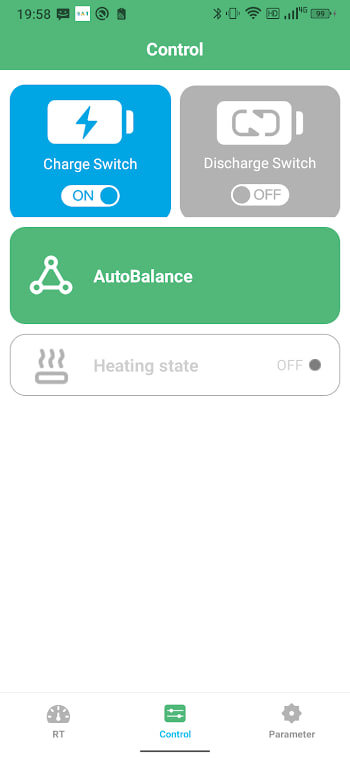
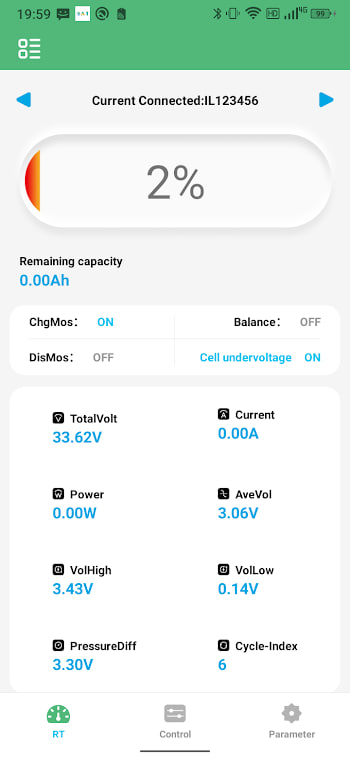
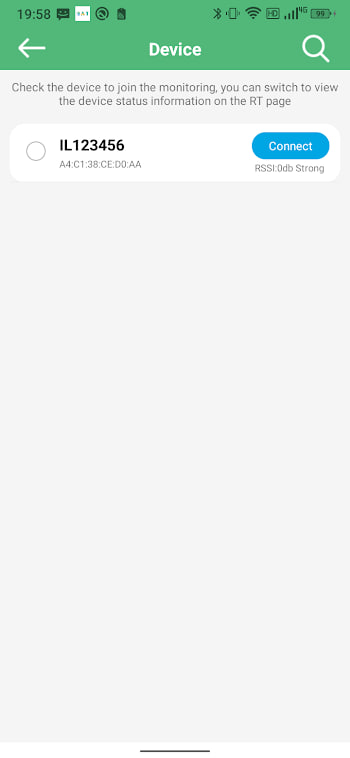
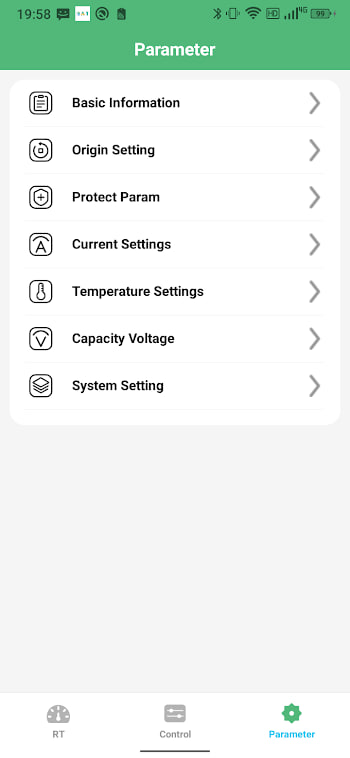
This is where BATBMS fits in. The app (also written BAT-BMS) is the free window into Grenergy-compatible smart boards: it shows state of charge, pack voltage, current, every individual cell voltage, temperatures, cycle count and the live status of each protection switch. Nothing about the app changes what the BMS does — the guardian guards whether or not anyone is watching — but it changes what you can do. A weak cell becomes visible months before it strands you. A tripped protection stops being a mystery. If you are new to it, the beginner guide covers the first connection, and the features tour walks through every screen.
One caution that recent events made famous: a Bluetooth BMS accepts connections from any phone unless you lock it. Set a pairing password — the password and pairing security guide takes ten minutes and closes the door properly.
How to read BMS specifications
BMS listings compress a lot into a short code. Decode it once and you can read any spec sheet.
- “4S”, “13S”, “16S” — the number of cell groups in series. This must match your pack exactly. A 13S board on a 16S pack is not a downgrade; it is a fire risk.
- “100A” — continuous discharge current. Peaks above this are tolerated briefly; sustained load must stay below it.
- “Common port” vs “separate port” — whether charging and discharging share one pair of wires or use two. Matters when replacing a board like-for-like.
- Balance current — how quickly the board can correct drift, typically 30–60 mA passive, up to several amps active.
- Chemistry setting — li-ion and LiFePO4 use different voltage ceilings and floors. The board must be built or configured for your chemistry; our supported batteries guide covers which chemistries the BATBMS ecosystem handles.
Common misconceptions
A quick myth-clearing checklist, because these come up constantly:
- “The BMS charges the battery.” No — the charger charges the battery. The BMS only permits or blocks it.
- “A BMS trip means the battery is faulty.” Usually the opposite: the BMS just prevented a fault from becoming damage. Find out why it tripped — the error codes guide maps each flag to its cause.
- “More amps is always better.” An oversized BMS protects less aggressively. Overcurrent protection on a 200 A board never triggers on a system that should not exceed 40 A.
- “The percentage comes from measuring the battery.” It is calculated bookkeeping, not measurement, and it drifts — see the SOC accuracy guide.
- “A BMS drains the pack.” Standby draw is real but tiny — typically well under a milliamp. A healthy pack loses more to self-discharge than to its BMS.
What a BMS cannot do
Honesty matters here, because a BMS is a guardian, not a miracle worker. It cannot add capacity back to aged cells. It cannot fix a cell with high internal resistance — it can only warn you, via the sag that shows up in per-cell voltages under load. It cannot protect against physical damage, water in the pack, or a charger with the wrong voltage plugged in by force. And it cannot compensate for a pack that was badly designed in the first place.
What it can do — silently, thousands of times over a pack's life — is stop the small excursions that would otherwise stack into an early death. Understand the four jobs, learn to read what a smart board tells you, and a lithium battery stops being a black box you hope for the best with, and becomes a system you actually manage. That, in the end, is the whole point of the name.